

Roku Stick vs Fire Stick comes down to interface style, remote design, and app support rather than raw power. Both stream in HD, FHD, UHD, and 4K, and both run third-party IPTV apps like Flixprime equally well. Your choice depends on whether you prefer Roku’s simplicity or Amazon’s Alexa-driven ecosystem.
Roku Stick vs Fire Stick: Which Should You Buy?
The Roku Stick vs Fire Stick decision is not about which device is “better” in a vacuum. It is about which experience fits how you already watch TV. Roku keeps things simple. Fire Stick leans into Amazon’s voice and smart-home tools.
The Short Answer
Roku wins on interface simplicity and a neutral, ad-light home screen. Fire Stick wins if you already own Echo speakers or other Alexa devices. Both support third-party IPTV apps, so live TV streaming works well on either stick.
Neither device restricts you from installing outside streaming apps. That means your actual streaming quality depends more on the app you choose than the stick itself. This matters a lot for anyone comparing Roku Stick vs Fire Stick for live channels.
Who Each Device Is Best For
Roku suits casual viewers who want a clean grid of apps without heavy content recommendations pushing them around. Fire Stick suits Amazon Prime members and Alexa users who want voice control tied into their broader smart home setup.
Do you stream mostly through third-party apps? IPTV is one example. IPTV stands for Internet Protocol Television. It sends live channels and on-demand content over the internet instead of cable or satellite. If you use apps like this, the stick itself matters less. The service you install matters more.
Roku Stick vs Fire Stick: Full Specs Comparison
Specs matter, but only to a point. Both devices support 4K streaming on their higher-end models, while entry-level sticks cap out at HD or FHD. Below is what to check before buying either device.
Processor & Storage
Processor speed and onboard storage affect how fast apps load and how many you can install. Exact chipset details vary by model year, so check your specific device’s listing before buying. Regardless of hardware, our service runs smoothly across Roku and Firestick thanks to Anti-Freeze™ Technology.
Roku’s newer Streaming Stick 4K uses an upgraded quad-core processor built for quicker app launches. Roku positions this chip as a meaningful step up from earlier models. Faster app boot times mean less waiting and smoother navigation for everyday streaming.
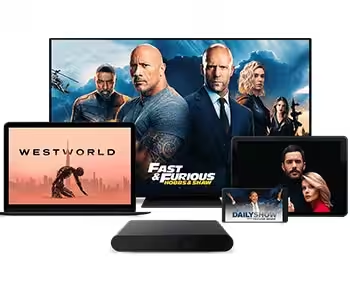
Roku Streaming Stick and Fire TV Stick differ less in raw specs than in daily experience. Whichever device you own, our service runs smoothly across Firestick, Roku, Android TV, and more, streaming in HD through 4K without buffering.
Resolution & HDR Support
Higher-end models from both brands support 4K with HDR. HDR stands for High Dynamic Range. It is a display technology that widens the gap between the darkest and brightest parts of an image. Entry-level sticks from both brands usually offer only HD or FHD.
Wi-Fi & Connectivity
Wi-Fi standard affects streaming stability more than most buyers realize. Older Wi-Fi standards can cause buffering on busy home networks. Our Anti-Freeze™ Technology counters this, delivering zero buffering during peak events across supported devices like Roku and Firestick.
Whether you prefer Roku or Fire TV Stick, the choice matters less than what you stream on it. Our service supports both devices equally, alongside Smart TVs, Android TV, Apple TV, and more, so your streaming setup stays flexible either way.
| Feature | Roku Stick | Fire Stick |
| Max Resolution | Up to 4K on higher models | Up to 4K on higher models |
| HDR Support | Available on select models | Available on select models |
| Processor/RAM | Not published | Not published |
| Wi-Fi Standard | Not published | Not published |
| Remote Type | Roku Voice Remote | Alexa Voice Remote |
| Voice Assistant | Roku built-in voice search | Alexa |
Interface and Ease of Use
Interface design is where Roku Stick vs Fire Stick differences show up the most in daily use. One favors a plain app grid. The other favors a scrolling, content-driven homepage.
Rather than debating Roku versus Fire TV Stick interfaces, both work seamlessly with our service. We support Roku, Firestick, Apple TV, Android TV, and more, so setup takes just one minute regardless of device, with instant activation and zero buffering.
Roku’s Home Screen
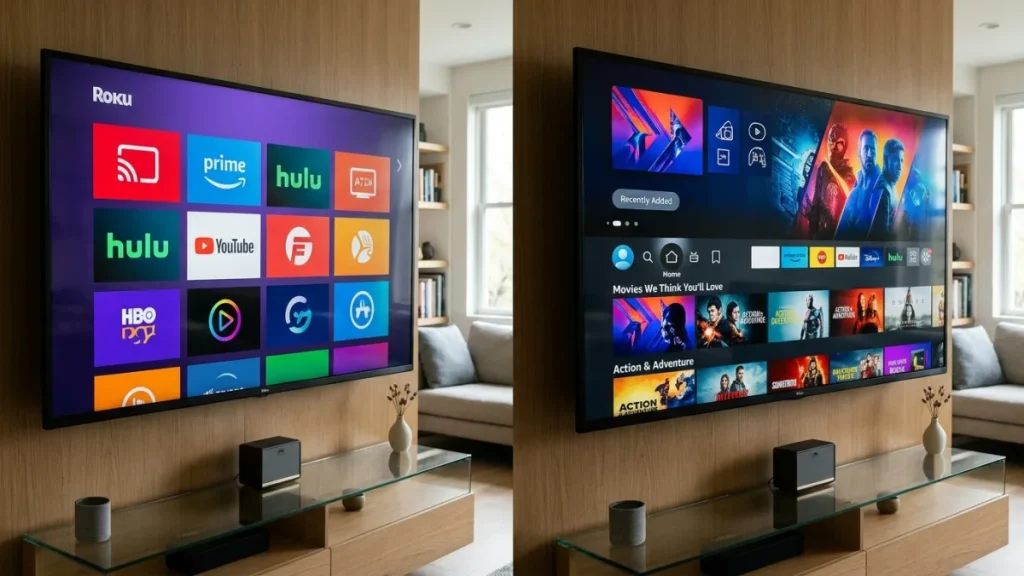
Roku’s home screen is a simple grid of app tiles. There is little algorithmic content pushed at you before you open an app. This appeals to viewers who already know what they want to watch.
Fire TV’s Content-First Layout
Fire TV’s home screen leads with show and movie recommendations before you even open an app. This suits browsers who like suggestions, but it can feel cluttered if you just want to jump into a specific app like Flixprime.

Remote Control and Voice Assistant Compare
The remote is where most people notice Roku Stick vs Fire Stick differences first. Button layout, voice search, and smart home tie-ins all differ between the two ecosystems.
Roku Voice Remote
The Roku Voice Remote includes dedicated shortcut buttons for major streaming apps and a simple voice button for universal search across installed apps. It keeps things minimal and easy to learn.
Alexa Voice Remote
The Alexa Voice Remote ties directly into Amazon’s smart home ecosystem. You can control compatible lights, thermostats, and other Alexa devices from the same remote, not just the TV.
Losing the Remote: Backup Options
Both ecosystems offer companion mobile apps that work as a backup remote if the physical one goes missing. This is a practical safety net that neither brand’s device gets specifically celebrated for, but both support it.

What Apps and Streaming Services Work on Each Device?
Most major streaming apps run on both devices without issue. This is a key reason the Roku Stick vs Fire Stick debate often comes down to preference, not compatibility.
Major Streaming Apps (Netflix, Prime Video, Disney+)
Netflix, Prime Video, and Disney+ are all available on both Roku and Fire Stick devices. Neither brand blocks the other’s ecosystem apps, even though Fire Stick naturally highlights Prime Video more prominently.
Do Roku and Fire Stick Support IPTV Services Like Flixprime?
Yes, both Roku and Firestick support Flixprime as a third-party IPTV app. Flixprime is built to run across a wide range of hardware, not locked to one ecosystem.
Performance shouldn’t depend on which box sits under your TV. Built with Anti-Freeze™ Technology, our service runs smoothly across Roku, Firestick, Android TV, and Apple TV alike, delivering zero buffering during peak events on any supported device.
Flixprime offers 17,000+ live channels and 117,000+ movies and series, all accessible whether you install it on a Roku Stick, a Fire Stick, or another supported device. That catalog size does not change based on which stick you use.
By comparison, built-in live TV hubs on streaming devices typically offer a limited channel selection. Flixprime, by contrast, offers 17,000+ live channels and 117,000+ movies and series, according to the brand.
- Smart TVs
- Firestick
- iOS
- Android TV
- Apple TV
- Phone and iPhone
- Tablet and iPad
- Roku
- Mag boxes
That device list is a first-party fact from Flixprime’s own platform. It confirms compatibility across nearly every screen a household is likely to own, including both sides of the Roku Stick vs Fire Stick divide.
Streaming Performance: Buffering, 4K, and Reliability
Streaming performance depends on more than the stick’s chip. Server-side technology from the app itself plays a large role in whether live channels buffer during busy viewing hours.
Does Resolution Alone Decide the Winner?
No, resolution alone does not decide the Roku Stick vs Fire Stick winner. A 4K-capable stick still buffers if the streaming app’s servers get overloaded during high-demand events like live sports.
This is why the app matters as much as the hardware. A weak streaming service will stutter on either device, regardless of which stick you paired it with.
How Anti-Buffering Technology Affects Live TV
Flixprime streams in HD, FHD, UHD, and 4K, powered by its own Anti-Freeze™ Technology, engineered to prevent buffering during peak events. Flixprime states zero buffering during peak event viewing as a direct, first-party platform claim.
This kind of server-side engineering matters more for live sports and news than whichever stick you plug into the HDMI port. It is a factor most Roku Stick vs Fire Stick comparisons overlook entirely.

Pricing: Device Cost vs. Ongoing Subscription Costs
The stick itself is a one-time hardware purchase. The bigger, recurring cost usually comes from the apps and subscriptions you layer on top of it afterward.
Roku Stick Price Range
Roku Stick models span budget to premium tiers depending on resolution support and remote features. Entry-level sticks favor simplicity, while higher-end versions add 4K, voice remotes, and faster processors. Choosing the right tier depends on your streaming needs and device compatibility.
Fire Stick Price Range
Fire Stick models also span budget to 4K tiers, with Amazon frequently running sales during major shopping events. Pricing varies by storage, resolution support, and remote features, so shoppers should compare current listings directly on Amazon before buying.
Hidden Costs: App and Service Subscriptions
The real ongoing cost is whatever streaming subscriptions you install afterward. This is where the Roku Stick vs Fire Stick price gap becomes almost irrelevant compared to monthly app fees.
Flixprime runs on a one-time payment model, not recurring auto-billing. Plans are priced at $18 for one month, $48 for six months, and $68 for twelve months. Flixprime also offers a free 24-hour trial and a paid 7-day trial for $8.
| Flixprime Option | Price |
| Free Trial | 24 hours, free |
| 7-Day Trial | $8 |
| 1 Month Plan | $18 |
| 6 Month Plan | $48 |
| 12 Month Plan | $68 |
These are one-time payments, with no recurring auto-charges applied without your action. That structure matters when you’re comparing long-term costs on top of either a Roku Stick or a Fire Stick.
How to Set Up an IPTV Service Like Flixprime on Roku or Fire Stick
Setting up Flixprime takes about a minute once you know the steps. The process is nearly identical whether you’re using a Roku Stick or a Fire Stick.
Step-by-Step Setup Basics
- Purchase a Flixprime plan through secured checkout.
- Receive instant activation details for your account.
- Follow Flixprime’s step-by-step setup guide for your specific device.
- Enter your credentials into the app on Roku or Fire Stick.
- Access the EPG (Electronic Program Guide, an on-screen schedule showing what’s airing on each live channel) to browse live channels.

What to Check Before You Subscribe
Before subscribing to any IPTV service, confirm device compatibility, trial availability, and refund terms. Flixprime provides EPG access on all subscription tiers, not as a paid add-on.
Flixprime also backs subscriptions with a 7-day money-back guarantee, plus 24/7 human support available through email and WhatsApp. Channels and services are automatically updated once a week to keep the catalog current.
Roku Stick vs Fire Stick: Final Verdict
There is no universal winner in the Roku Stick vs Fire Stick debate. The right pick depends on your existing ecosystem and how you plan to use the device.
Best for Simplicity
Roku wins here. Its plain app grid and lack of heavy content recommendations make it the easier device for casual, distraction-free viewing.
Best for Amazon Ecosystem Users
Fire Stick wins here. If you already use Alexa, Echo devices, or Prime Video heavily, the integration feels more natural on Fire Stick than on Roku.
Best for IPTV and Live TV Streaming
Neither stick wins outright here, because IPTV performance depends on the app, not the hardware. Flixprime runs on both, backed by Anti-Freeze™ Technology and a 7-day money-back guarantee to test it risk-free on whichever stick you own.
Flixprime’s 800,000+ users worldwide stream across Roku, Firestick, Smart TVs, Apple TV, Android TV, phones, and tablets. Whichever device you already own, Flixprime supports it, with Anti-Freeze Technology keeping playback smooth regardless of platform.
Is Roku or Fire Stick better for streaming IPTV services?
Both work equally well for IPTV services like Flixprime. Neither Roku nor Fire Stick restricts third-party live TV apps, so your streaming quality depends on the service’s servers, not the stick’s brand.
Can I use Flixprime on both Roku and Fire Stick?
Yes. Flixprime supports Roku, Firestick, Smart TVs, iOS, Android TV, Apple TV, phones, tablets, iPads, and Mag boxes. You can switch devices without losing access to your subscription.
Which streaming stick has less buffering during live sports or events?
Buffering depends mostly on the streaming app’s server infrastructure, not the stick. Flixprime supports both Roku and Firestick devices, delivering zero buffering during peak events through its own Anti-Freeze™ Technology, regardless of which stick you choose.
Do I need a separate subscription fee to use Roku or Fire Stick?
The stick itself is a one-time hardware purchase. Ongoing costs come from apps you install, like Flixprime, which offers one-time plan payments at $18, $48, or $68 instead of recurring auto-billing.
What’s the difference between the Roku and Fire Stick remotes?
The Roku Voice Remote keeps navigation minimal with app shortcut buttons and voice search. The Alexa Voice Remote adds deeper smart home control, letting you manage compatible devices beyond the TV itself.
Is there a risk-free way to try an IPTV service before committing?
Yes. Flixprime offers a free 24-hour trial, a 7-day trial for $8, and a 7-day money-back guarantee on subscriptions. This lets you test compatibility on either a Roku Stick or Fire Stick before paying full price.
Does Flixprime require a recurring subscription like Netflix or Prime Video?
No. Flixprime uses a one-time payment model per plan, with no automatic recurring charges. You choose 1-month, 6-month, or 12-month terms and pay once for that period.
Key statistics
- A 2026 survey found that Roku’s operating system is the most commonly used platform among U.S. households that stream via smart TVs or streaming media players, at 55%. (Statista, 2026)
- Amazon’s top-tier Fire TV Stick 4K Max runs on an optimized 1.8GHz quad-core processor and supports Wi-Fi 6. (Amazon Developer Documentation, 2026)
References
- Roku Streaming Stick 4K supports 4K, Dolby Vision, and HDR10+ picture quality on compatible TVs. — Roku (Official manufacturer product page)
- Fire TV Stick 4K Plus and 4K Max support Wi-Fi 6 for smoother 4K streaming with less network interference. — Amazon Developer Documentation (Official manufacturer technical specification page)
- The Roku Streaming Stick 4K uses an ARM Cortex A55 CPU, the same processor found across other Roku streaming players like the Express 4K, 4K Plus, and Ultra. — International Business Times (Hands-on technical hardware review citing manufacturer chipset details)
- The Fire TV Stick 4K (2023) uses a MediaTek MT8696D chipset with a quad-core Arm Cortex-A55 processor running at 1.7GHz. — CNX Software (Independent technical teardown citing official Amazon specification codenames)
- The entry-level Fire TV Stick HD supports only Wi-Fi 5 and has 1GB of RAM, while the Fire TV Stick 4K has 2GB of RAM and Wi-Fi 6 support. — Liliputing (Independent hardware comparison sourced from manufacturer specifications)